Skip to content

Never Enough Time

The Passage of Time

Image by ToniVC via Flickr

Like many things in life, there’s never seems to be enough time for user research. Sessions are too short, and there’s never enough time to analyze the results. What effect does this have on the quality of the research? A lot!  But surprisingly, just adding a little extra time can make all the difference.

Not enough time for sessions

User research sessions are frequently too short, leaving you to decide whether to rush through the session, trying to cover everything at a high level, or you only cover a portion of the questions. Either way, you waste an opportunity.

The time needed for research sessions is unpredictable. The focus of research always seems to expand with additional client requests and topics that you would like to cover. You never know exactly what you’ll encounter during a session. Some participants have more to discuss than others, some encounter more problems than others, and some are just more talkative. So session times can vary greatly between participants.

It’s always better to err on longer sessions. If you plan for more time than you need, no one minds ending early and getting back some extra, unexpected time. For participants, there’s not all that much difference between a one hour session and a 90 minute or two hour session. If they’re coming in to your lab, a focus group facility, or some other location, the biggest obstacle is taking the time out of their day to travel to and from the location. Once they’ve made that effort to get to you, an extra 30 to 60 minutes doesn’t make much of a difference. So plan longer research sessions to ensure you have enough time to cover everything.

Not enough time for analysis

It always amazes me that people will spend so much time and money planning, recruiting participants, and conducting the research and then provide too little time for analysis in a rush to get the findings. Analyzing user research can be extremely time consuming. Unfortunately, you rarely get enough time to analyze the results. Listening to recordings, typing up notes, organizing the notes into themes, analyzing the findings, and then creating deliverables takes time. When this process is rushed, quality is compromised.

Sometimes clients are excited by the idea of conducting research, but are too impatient to wait very long to hear the results. They are usually under the impression that by simply observing the sessions, high-level, overall findings will emerge. They aren’t concerned with taking time to analyze the details. This method often leads to shallow and misguided findings.

Of course there are reasonable limitations in terms of how much a project can wait for analysis and the presentation of the results, but often the time to analyze the results is set arbitrarily. The user researcher then either has to work extremely long hours to fit an enormous amount of work into a small time frame or has to find ways to cut corners.

User research is time consuming and expensive. After putting so much time and money into it, it makes no sense to short change the final step that provides the most value. Providing even a little extra time for analysis can make a big difference in the quality of the findings and in improving the job satisfaction of your user researchers.

The bottom line, provide more time for each user research session and more time for analysis. It won’t add that much more to the cost of your user research, and it will add a lot to the quality of the results.

Stay Involved with a Usability Review

Before software usability testing emerged in the 1980s and became more widespread in the 90s, quality assurance testing was the only way software was tested before release. Quality assurance was focused on ensuring that developed software met the defined requirements and did not contain any defects. However, requirements were rarely generated through user research. Instead they were usually generated by business stakeholders and documented by business analysts. If users were involved at all, they were often represented by a few subject-matter experts gathered in meetings to talk about what they wanted the software to do.

Bug tracking software

Quality Assurance Testing

Quality assurance analysts tested the software to find technical defects. If the software did what it was supposed to do according to the requirements, it passed the test, regardless of how usable it was or how well it fit the needs of the users.

User Acceptance Testing

“Users” and stakeholders were also involved in user acceptance testing, which was really just a sign off that the software did what it was supposed to do. Occurring at the very end of the software development process, it was difficult to make anything but very minor changes at that point. As long as the software did what it was supposed to do, stakeholders were willing to overlook usability issues. It seemed easier to write off any problems as things to address in training, rather than to require additional development work.

The Evolution of Usability

As it became obvious that this method of software development was failing to address usability issues, usability testing was added to projects in a similar manner as quality assurance, evaluating software at the end of a project to find and fix usability problems. As it became apparent that this was too late to make any major changes, usability testing gradually moved further and further forward in the design process, with multiple iterations of design and testing. Eventually people realized that it would be better to avoid problems in the first place by finding out what users really need at the beginning of the project. Proper user research was born.

We Forgot the End of Projects

Unfortunately, as we’ve moved user research and usability testing earlier in the process, we’ve tended to overlook the end of projects. We do the upfront user research through iterative design and usability testing, but once development begins, we often drop out and move on to the next project. Then when the final product is released, we often find ourselves scratching our heads, thinking, “what happened?” as we see it varies greatly from what we intended.

All kinds of things can happen between the final design iteration we test and the final coded interface. Without being involved in checking the final design and development, problems tend to slip through.

Usability Review

To solve this problem in a previous job, I created a process I called a Usability Review. During functional QA testing, a usability analyst would review the developed application looking for usability and design problems. Any issues found were entered in the QA bug tracking software (Test Director in this case) as usability or design issues and assigned to a developer to review and fix. After fixing or rejecting the problem, the developer assigned the issue back to the usability analyst to either accept or reject the solution. This worked very well and caught a lot of issues.

Advantages of a Formal Usability Review

You may think that staying involved throughout the project would be enough to find and prevent any usability and design problems, but there are several advantages to having an official, detailed usability review process.

  1. As an official step in the project, the usability review gets added to the project plan, ensuring that it will actually take place and that someone will let you know when the application is ready for review. Without that official task in the project plan, it’s easy for others to forget to notify you, and when you’re busy on other projects, it’s easy for you to forget also.
  2. A usability review requires you to examine the application in detail, rather than giving it an overview. A detailed examination tends to find more problems and gives you a more realistic sense of how well it will work for the users.
  3. Entering the issues in the QA bug tracking software gives usability and design problems the same importance and status as QA defects, makes someone responsible for fixing them, and gives you the power to approve or reject the solution.

Can’t QA People Perform the Usability Review?

Can’t Quality Assurance people find usability and design issues themselves, or can’t they be trained to do that? Yes, it’s possible, but usually they don’t have as much knowledge and experience in user experience issues, and they are not usually involved in the user research and usability testing that takes place earlier in the project. Usability and design professionals are the best judges of whether the final application matches the intended design and user experience.

When you do a usability review, you’ll often find issues that are QA defects, and the QA analysts will often find things that appear to be usability or design issues. A good way to coordinate efforts is to enter technical defects and assign them to the QA analyst to assess. The QA analyst can assign any usability or design issues that he/she finds to you to assess.

So add a usability review to your projects and you’ll find that it pays to keep usability and design formally involved all the way to the end of a project. You’ll end up with final products that more closely match the original vision.

New article: Learning the Subject Matter

As a consultant, I work with many different clients from a variety of industries. My company, Electronic Ink, focuses on designing business systems, which means our projects are usually much more complex than the typical website.

My job as a design researcher is to uncover and understand the business needs and user needs. But even before beginning stakeholder interviews and user research sessions, I have to know something about the subject matter to ask the right questions and to understand what I’m hearing and observing. There is usually very little time at the beginning of a project to get up to speed on the subject matter. When the subject matter is very complex, I find that to be the most difficult part of the project.

I recently wrote an article for Johnny Holland (the interaction design blog) about this issue. Read the entire article: Learning the Subject Matter.

New article: The Ghost Hunter’s Guide to User Research

Image by Sam Breach via Flickr

What do ghost hunting and user research have in common? That’s the question I try to answer in my latest article on UXmatters: The Ghost Hunter’s Guide to User Research.

As a fan of the SyFy Network series, Ghost Hunters, I began to see parallels between the work the TAPS team did and user research. It sounds like a stretch, but there are some interesting similarities.

At first, I was a little hesitant about publishing this story and sat on it for over a year. I worried that it might be too frivolous. But as I explored the topic further, I realized this was a humorous and interesting way to look at user research, and it seemed a perfect article to publish around Halloween.
The reaction has been very positive. I expected my article to be read by the user experience community, but I was surprised to see the attention it has received from the paranormal/ghost hunting world as well.

Read the entire article at UXmatters: The Ghost Hunter’s Guide to User Research.

Attend a Conference

CHI 2012, Interaction 12, IA Summit 2012, and UPA 2012It’s conference season again. The time is approaching to submit proposals to present at the major user experience conferences for 2012. Submissions for CHI 2012 are open, and the UPA 2012 and IA Summit calls for presentations are coming soon. If you’re just interested in attending, registration for most of these conferences is months away. But it’s still a good time to start looking into conferences you want to attend and to prepare to convince your employer to pay for them.
After not attending conferences for a few years, due to the recession, I attended and presented at UPA 2011 this year. I learned a few things, caught up with former colleagues, met some new people, and rekindled my passion and interest in user experience. It was a great experience that reminded me of the many benefits of attending conferences.

Benefits of presenting at a conference

Even better than attending a conference is presenting, which provides a number of benefits.

  • You get to contribute and share your knowledge with the user experience community.
  • It increases your visibility in the field, and people think of you as an expert on the subject you present.
  • It looks impressive on a resume.
  • It’s impressive to people in your company and to clients.
  • It’s a good way to network and meet others. People who attend your session often come up to you afterwards to ask questions and to talk about your topic.
  • It’s a good ego boost. You feel good that so many people are interested in what you have to say and in getting your feedback. It builds confidence and makes you want to speak again.
  • You often get free or discounted conference registration. And most companies are more likely to pay to send you to a conference if you are presenting rather than just attending.

Benefits of attending a conference

Whether you present or not, there are also many benefits of attending a conference.

  • You learn new things. Regardless of how many years of experience you have, at a good conference, you learn a few new tips and techniques. As an experienced professional, you may have less to learn than someone new to the field, but I find that I pick up at least a few new things that I may not have thought of on my own.
  • You hear new perspectives. Working with the same people all the time, it’s easy to get caught up in your usual way of doing things and to forget that there are alternatives. Conferences are a great way to hear how people at other companies approach problems differently. You may not always agree, but it’s interesting to hear other viewpoints and methods that you wouldn’t normally hear.
  • You get inspired. Taking a break from your normal work routine and surrounding yourself with a roomful of user experience people talking about important issues in the field is inspiring. I find that a good conference is rejuvenating and recaptures the interest that I had when I first started in the field.
  • It’s a great place to network. User experience is a small field. You often run into the same people that you’ve met at previous events, former coworkers, and clients. Since so much networking is done on social media these days, a conference is the place to finally meet people in person.
  • It helps your career. A conference is a great way to see what other companies are out there, what other people are doing, to see who is hiring, to network with those who are hiring, and to even interview for jobs. Most conferences facilitate job hunters and companies looking to hire with job boards and interviews at the conference.

Event listings

If I’ve inspired you to speak at or attend a conference, the following sites seem to have the best listings of user experience events:

Find UX Events

Lanyrd

HCI Bibliography Events Calendar

Johnny Holland Calendar


How Effective are Incentives for Online Card Sorting?

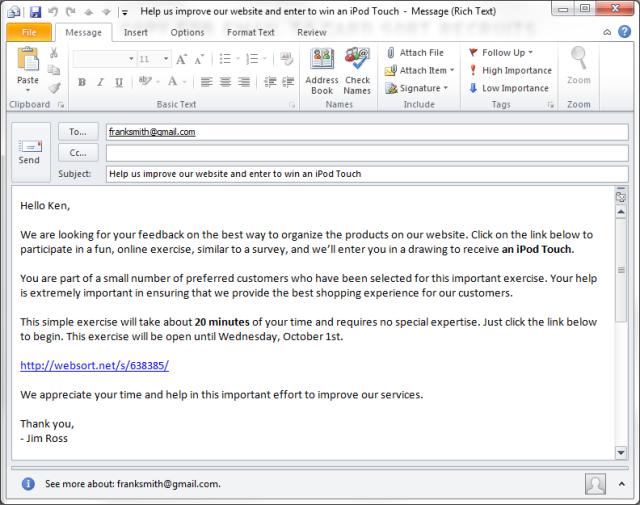
Unmoderated card sorting tools are a great way to reach a large number of geographically dispersed participants for your card sorting study. With mass emails you can reach a large number of potential participants, but the challenge is getting people to participate in the study. Unfortunately, few people actually open and read these emails, and even fewer take the time to participate in the study.

Email invitation to an online card sorting study

How do you motivate people to participate?

So how do you motivate people to participate in Web-based card sorting or another type of unmoderated, remote user research study? Incentives! But what type of incentive works best for a mass audience? You can give an incentive to each participant, but with a large number of participants that can be very expensive. And if you give each participant a small incentive of say $5.00, how motivating is that?

A common alternative is using a sweepstakes-style drawing. One of the participants out of hundreds will get a gift card or other incentive. But how effective is this sweepstakes-style incentive in increasing the number of participants? Does it affect the quality of the results by encouraging those who are only interested in the incentive and not in completing the study seriously?  Can you motivate people to participate in a study without any incentive? What are the other variables that affect participation?

Continue Reading →

What to Do When You Have Nothing to Do

There’s definitely a sweet spot in terms of the amount of work you do. Ideally, you have enough work to keep you busy, enough variety to keep you interested, and enough time to do quality work, without sacrificing your personal life to meet deadlines.

But for most people, there are times when work slows down. At first it’s nice to have a break for a few days after being incredibly busy. You catch up on emails, read articles that you’ve been meaning to look at, file expense reports, clean up the piles of paper on your desk, and other administrative things. However, too many days with nothing to do can be unnerving. At first, you may begin to feel restless and bored. The days crawl by. After a few more days, you may begin to question your worth and feel guilty about having nothing to do.

It doesn’t have to be that way. There are a number of things to keep you busy when things slow down at work. These things will make you feel useful and give you a sense of purpose, will make your employer think that you’re doing something useful, and will help your career.

Learn something new

Especially in the field of technology, you never stop learning. No matter how experienced you are, there’s always something new to learn. It’s important to keep your knowledge up to date with new developments in your field. That’s hard to do when you’re busy. So down times are the perfect time to catch up on your learning. This can take several forms:

  • Read articles in professional journals, online magazines, blogs, and other Web sources. If you follow the right people, Twitter is a great source of links to the most interesting and relevant user experience articles.
  • Research other user experience methods, technologies, and processes you can use. Look into new research and design tools.
  • Catch up on the latest user experience books. If you haven’t looked at what’s out there in a while, you’ll be surprised by the number of new books. Look on Amazon or publishers’ sites, like Rosenfeld Media. But be careful not to read a book at work. That makes it a little too obvious that you’re not doing real work.
  • Attend professional training.
  • Do Web-based training through an online source such as Lynda.com.
  • Look into conferences that you might want to attend, and use this time to write up a justification of the benefits of attending to convince your company to pay for it.
  • Conduct your own research study in an area that interests you.

Share your knowledge

A lot of people overlook the fact that they have a lot of knowledge and experiences to share with others. When you’re not busy, it’s a great time to reflect back on your work and write down your insights and experiences from your recent projects. Many of us don’t do this because we think we don’t have anything interesting to say that hasn’t already been said before. But if you sit down and brainstorm, you’ll be surprised how much you have to contribute. Some ways to share your knowledge with others are:

  • Write a blog.
  • Write articles for online magazines such as UXmatters, Johnny Holland, Boxes and Arrows, etc.
  • Write articles for professional journals or association magazines.
  • Prepare a paper, presentation, panel, tutorial, or workshop for a conference.
  • Present at a local professional association meeting like CHI or UPA local chapters.
  • Present to an internal group within your company.

Work for yourself

When you’re not working on other people’s stuff, work for yourself. Most of the learning and sharing activities I listed above will boost your career, but here are a few additional things you can do. Be careful about doing these things at work, however.

  • Document the work you’ve done by working on your portfolio, preparing case studies (for your company or for yourself), and created scrubbed work samples to remove client confidential material.
  • Manage your Twitter profile: look into additional people to follow, look through the list of people you currently follow and determine if there are some less useful people you should remove, and do some tweeting yourself.
  • Review your LinkedIn profile and update it. If you haven’t looked at LinkedIn in a while, there are many new features you can add to your profile. See if there are more people you should connect with. Write recommendations for people you think really deserve it.
  • Look into other professional associations you can join and local events you can attend. If you’re really ambitious, you can look into ways to volunteer in local and national associations, such as organizing and helping run events.

These things can keep you busy, make you feel useful, and are a good way to keep your skills sharp and advance your career during what could otherwise be a boring and painfully slow period. When the work eventually picks up again, you’ll be glad that you used you free time wisely.

Online Ticket Ordering Pressure!

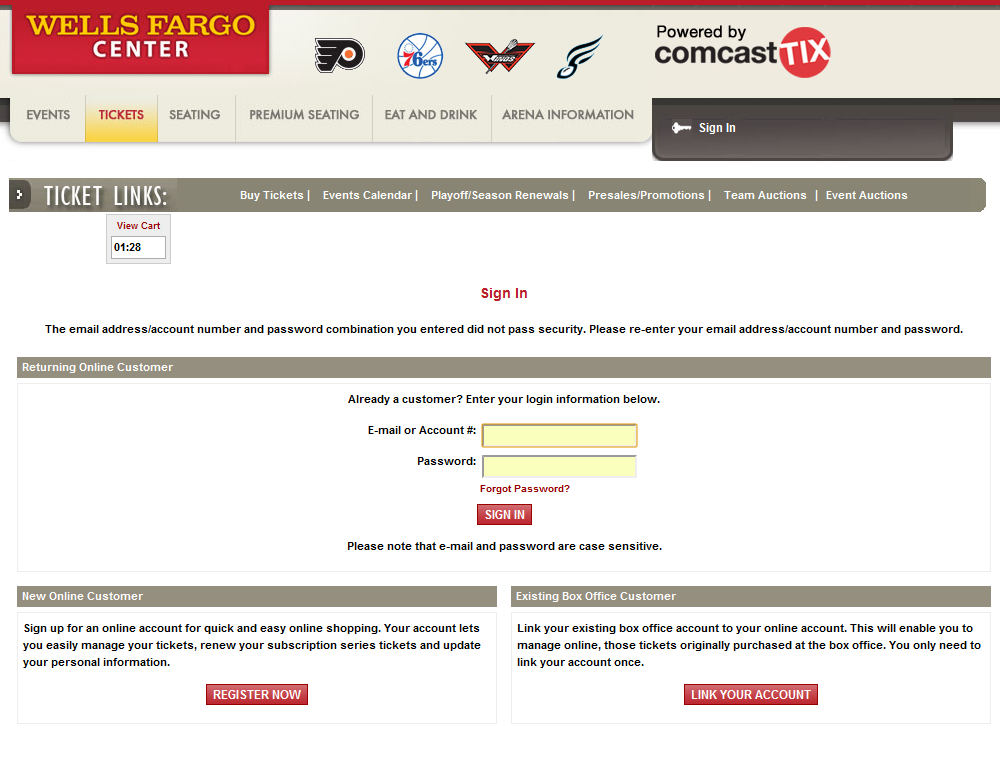
Login problems make online ticket ordering difficultThere’s probably no higher pressure experience for a consumer than ordering tickets for a popular event online. Once the tickets go on sale, you’re competing against thousands of other people for the best seats. Time is of the essence! Once you enter the number of tickets you want and the search results come back, those tickets are reserved for five minutes. A countdown clock starts ticking down the time to complete your order. If you don’t finish within that time, your tickets are released and you have to start over again with much worse seats.

I recently ordered tickets for a Foo Fighters concert on Comcast Tix, the vendor for the Wells Fargo Center in Philadelphia. They went on sale at 10am on a Monday, and I was one of the first into the site at 10am. I was excited to see that I had floor seats. I’ve never been so close to the stage before in a major concert.

As the clock started ticking down, the first screen asked me to enter my user name and password. I had ordered tickets from Comcast Tix before, but it was a long time ago. I don’t usually remember or take the time to write down passwords for sites that I use infrequently. I tried my standard password that I usually use in situations like this, but it didn’t work. I tried another variation, but that didn’t work either. Glancing at the countdown clock, I saw the time ticking away and started to sweat.

Maybe I had the wrong email address entered as the user name? I tried another email address. That didn’t work. I thought about going through a password reset, but by the time I got that, I’d lose the tickets.

Okay, maybe I’ll just try the option to complete the purchase with a new account. I filled out the form, but I got an error message saying that my email address was already in use as an existing account. Now I was really getting nervous. I only had two minutes left.

Finally, I hit upon the solution. I’d create a new account using my work email address. That worked! Now I had less than two minutes to race through the forms to complete my purchase or I’d lose the tickets. Glancing at the countdown clock as I raced to complete the forms, I felt like I was defusing a bomb. Finally I completed the transaction and got the tickets. Whew!

If ever there was a situation that needed foolproof usability, it’s the online ticket buying experience. I recognize the need to only hold tickets for a limited period of time, but the checkout process has to be extremely simple. An easy solution would be to give people the option to checkout without creating or logging into an account.

Especially when they charge you a $5.00 “convenience charge” and $2.75 “delivery charge” to print the tickets yourself online, they should offer a much better experience. That, or give you a $20.00 “poor usability” discount.

New Article: Client Reactions to User Research Findings

As a design researcher, I’ve heard a lot of reactions from clients about the user research findings, both positive and negative. Fortunately, they’ve been mostly positive, but the negative reactions make for the best stories. I’ve written about those in my latest article in UXmatters: Client Reactions to User Research Findings. It includes the following reactions:

  • “Ho hum. Where are the designs?”
  • “We already knew that.”
  • “You’re wrong!”
  • “You talked with only 12 people.”
  • “Why didn’t you mention this problem?”
  • “The recommendations aren’t specific enough.”
  • “We could have done that ourselves.”

Read the entire article at UXmatters: Client Reactions to User Research Findings.

Netflix: It’s About the Format

Okay, it’s also about the format. In my last post, I wrote about how the choice between Netflix streaming and DVD was about the content. Netflix’s streaming content is mostly poor quality and quantity, while you can get almost anything you want by DVD. But format also makes a difference. If the content was the same in both formats, I think streaming would have a definite advantage.

The ability to instantly watch a movie from any internet-connected device is a great advantage of streaming, although many people don’t have a wired internet connection near their TVs and setting up a wireless network is beyond them.

Streaming provides the freedom to choose what you want to watch, when you want to watch. Although sometimes that freedom of choice can be paralyzing. When you have DVDs, you feel a commitment to watch them. They came in the mail, and even if you turn them off and send them back, it will be a while before you receive more. With streaming if you don’t like what you’re watching, you can stop and have a multitude of choices available. Sometimes I find the initial choice of what to watch difficult enough, but if a movie doesn’t grab me quickly, I end up second guessing myself and wondering whether I should have picked something else. Having so many choices instantly available seems to cheapen their value, whereas a DVD that I need to watch and return to get another, seems more urgent to watch.

DVDs require much more maintenance of your queue, strategically placing new releases at the top to get them sooner. What you watch tonight is based on a decision you made several days or weeks ago. We’ve all experienced that feeling of disappointment receiving a DVD other than the one we expected. The queue for streaming isn’t that important, except to prioritize which items you want to watch first and to save items that you might want to watch later.

The mailing schedule of DVDs can require strategic maneuvering. To make sure you have your new DVDs by the weekend, you have to make sure that the previous DVDs are returned by Wednesday. How many families have been annoyed by a slowpoke who didn’t watch a movie and return it in time to get another for the weekend? To be the first in line to get a new release that comes out on Tuesday, you can time the return of your DVDs on Friday or Saturday. Send them back too soon or too late and you may not get the new release.

With the decline of DVD sales, studios are beginning to become unfriendly to the rental market by creating rental-only copies stripped of special features and filling them with previews and ads that you can’t skip through. I recently watched a new release from Warner Brothers that had 17 minutes of non-skippable previews and ads, including several promoting the purchase of the Blue-ray version. Streaming, for now, contains no previews or ads, but the studios’ influence can be felt in the limited quantity of streaming titles and Netflix’s price increase to cover the increased cost of licensing content for streaming.

So it’s the format and the content. Streaming is a more efficient format, but the content needs to vastly improve before it will replace DVDs.